
Note
Go to the end to download the full example code.
Swing-Twist Decomposition#
Any rotation can be split into a twist about a chosen axis and a swing
that rotates the axis itself, such that q = swing * twist (the twist is
applied first). The twist is a rotation about the given axis and the swing is a
rotation about an axis orthogonal to it. This is convenient, for example, to
separate the roll about a link axis from the remaining orientation.
Here the twist axis is the body z-axis. We take an arbitrary rotation, decompose it into its swing and twist components, and recompose them to recover the original orientation.
import matplotlib.pyplot as plt
import numpy as np

from pytransform3d.rotations import (
    axis_angle_from_quaternion,
    matrix_from_quaternion,
    plot_axis_angle,
    plot_basis,
    quaternion_from_axis_angle,
    swing_twist_composition,
    swing_twist_decomposition,
)
We pick an arbitrary rotation and decompose it about the body z-axis. The decomposition returns a swing (a rotation about an axis orthogonal to z) and a twist (a rotation about z).
axis = np.array([0.0, 0.0, 1.0])
q = quaternion_from_axis_angle([0.6, 0.3, 0.8, np.deg2rad(100.0)])

swing, twist = swing_twist_decomposition(q, axis)
Recomposing the swing and twist recovers the original rotation. The reconstruction may differ in sign, since a quaternion and its negation represent the same rotation, so we compare rotation matrices.
q_recomposed = swing_twist_composition(swing, twist)
print(
    "Recomposition matches original:",
    np.allclose(
        matrix_from_quaternion(q), matrix_from_quaternion(q_recomposed)
    ),
)
Recomposition matches original: True
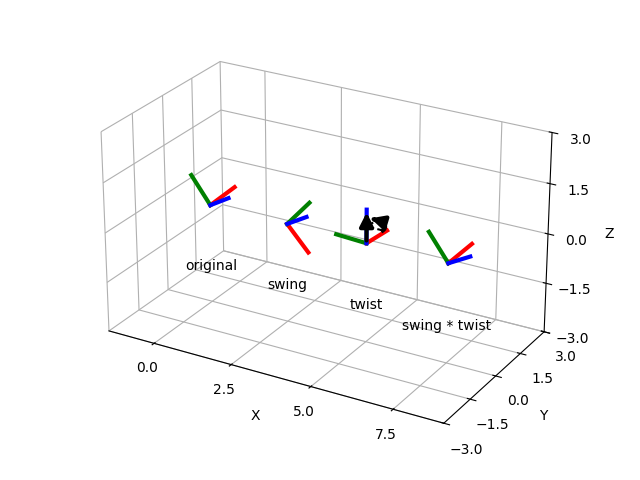
We visualize the pieces as a sequence of frames along the x-axis. From left to right: the original rotation, the isolated swing, the isolated twist, and the recomposed rotation (swing * twist), which coincides with the original. The black arrow marks the twist axis and its arc shows the twist angle.
frames = [
    (q, "original", 0.0),
    (swing, "swing", 2.5),
    (twist, "twist", 5.0),
    (q_recomposed, "swing * twist", 7.5),
]

ax = None
for q_i, label, offset in frames:
    p = np.array([offset, 0.0, 0.0])
    ax = plot_basis(ax=ax, R=matrix_from_quaternion(q_i), p=p, ax_s=4, lw=3)
    ax.text(offset, 0.0, -2.0, label, ha="center")

# Draw the twist axis and angle on the twist frame.
plot_axis_angle(ax, axis_angle_from_quaternion(twist), p=[5.0, 0.0, 0.0])

ax.view_init(elev=25, azim=-60)
ax.set_xlim((-1.5, 9.0))
ax.set_ylim((-3.0, 3.0))
ax.set_zlim((-3.0, 3.0))
ax.set_box_aspect((10.5, 6.0, 6.0))
plt.subplots_adjust(left=0, right=1, bottom=0, top=1)
plt.show()
Total running time of the script: (0 minutes 0.066 seconds)